
Category: Cloud / Enable OneDrive API and get login credentials for backup
Iperius is a powerful and complete backup software that allows OneDrive backup and cloud backup on all major storage platforms: Google Drive, OneDrive for Business, Amazon S3, Azure Storage and Dropbox.
With this simple tutorial we’re going to see how to enable the OneDrive API and get the Client ID code (App ID) to perform remote backup (clearly this procedure to enable the OneDrive API can be useful for using services and storage OneDrive from any other software).
See also: Automatic backup to OneDrive usingIperius.
For the creation of the “App” and to obtain the access credentials to be used inside Iperius, go to the following link: https://portal.azure.com/#blade/Microsoft_AAD_RegisteredApps/ApplicationsListBlade
NB: Users who have previously created the App through the link https://apps.dev.microsoft.com/#/appList , they can find the Apps already registered and the client IDs unchanged on the Azure portal. This site has been deprecated, so we strongly suggest to delete the registered Apps and recreate them directly in the Azure portal.

Once authenticating in the Azure portal, entering the One Drive credentials, click on “New Registration” in order to create a a new App:
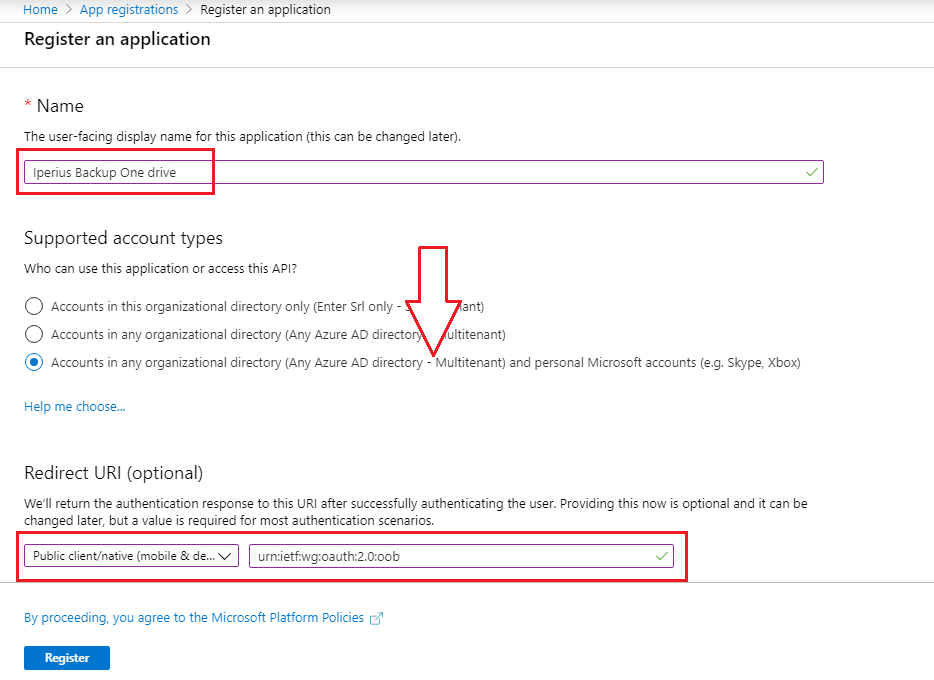
Type in the “Name” of the application you are going to create, in the field “Supported account types” choose “Accounts in any organizational directory (Any Azure AD directory – Multitenant) and personal Microsoft accounts (e.g. Skype, Xbox)” and then in the field “Redirect URI” enter the code below:
urn:ietf:wg:oauth:2.0:oob
Click on “Register”.
You will see the generated Application (client) ID that Iperius will use to authenticate itself and send backups to OneDrive through a secure connection.
From the side menu, click on “Authentication”, set “Live SDK Support” to “No” and click on “Save”.

To know how to make backups to OneDrive, look at the related tutorial.
OneDrive and OneDrive API
OneDrive is Microsoft cloud storage service. Initially born as a free service, it has over time turned into a complete platform for managing and sharing files online. Today OneDrive is also part of Office 365, the Microsoft cloud platform for document management, mail and other important services. In this case we talk about OneDrive for Business, a paid service with prices and plans that we can find on this page: https://onedrive.live.com/about/it-it/plans/
Iperius Backup can use the OneDrive platform to back up files in its online space, even with compression and AES 256-bit encryption. In addition, Iperius is also compatible with Office 365, specifically with the Exchange Online mail service, which can be backed up easily and efficiently locally.
In the context of interoperability with various software, websites and third-party services, OneDrive makes available the OneDrive API, which allows software such as Iperius to communicate with this service to send and download files. The OneDrive API documentation can be viewed on these official Microsoft website pages: https://docs.microsoft.com/en-us/onedrive/developer/rest-api/?view=odsp-graph-online
Limitations
However, we would like to remind you that the OneDrive API has some limitations regarding the maximum file size. Restrictions and limitations regarding OneDrive can be found on this page: https://support.office.com/en-us/article/invalid-file-names-and-file-types-in-onedrive-onedrive-for-business-and-sharepoint-64883a5d-228e-48f5-b3d2-eb39e07630fa#individualfilesize